
The Only Monthly Mac Blog That Matters…

Month: September 2026

Back to Backing Up

Here’s a question I’m constantly asked: “What is the difference between backing up and syncing my data?”

And the question that follows next: “How do I get it back in the even that things go totally wrong?”

When I’m called and informed that a client’s computer has died or gotten lost/stolen, the first thing I ask, “Is the data backed up?” Sometimes yes, sometimes no. Well, that depends, whether the data was synced (via a cloud service such as iCloud, Google Drive, Dropbox, etc.) or if was backed up to local hard drive (a hard drive physically connected to the computer) or using a cloud-based backup service such as Carbonite or Backblaze.

So, let’s differentiate the two types of services, both of which have pros and cons: A service that SYNCS keeps your data consistent on two (or more) devices. So, if you have a desktop computer and a laptop (or iPad, iPhone, etc.), your data is same on all devices, assuming they’re connected to Wi-Fi. iCloud is Apple’s syncing service. The advantage of this: Changes made to your data on one device is reflected on the other.

However, the disadvantage of syncing is in the event you lose a document (or accidently save an older version), is that you can’t go back in time and recover the correct one. (For the most part.) For that, you need a backup. A local backup that uses Time Machine (Apple’s backup program that’s part of the macOS) enables you to recover documents from previous backups. As long as don’t forget to connect the external drive to the computer.

Similar to the local backup, using one of the aforementioned cloud backup services will also allow you to recover accidently deleted files, or older version of file. Again, as long as the backup is working. Those types of services can be flaky, and need babysitting.

Continue Reading

September’s Quick Tip (Your iPhone’s Wallet app)

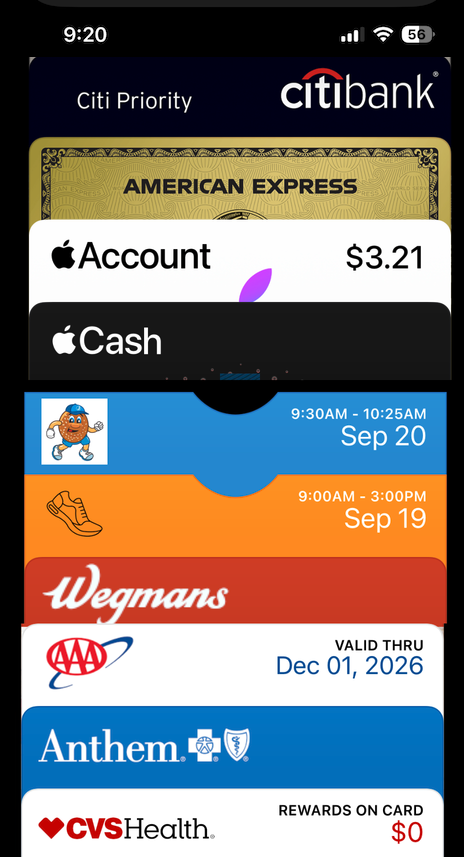
A great way to keep your credit cards, loyalty cards, event tickets, and airline tickets within reach is in your iPhone’s wallet app. If you’ve ever seen somebody pay by touching their iPhone to the credit card reader, they’re using Apple Pay with a credit card stored in the wallet. 

In addition, you can store your loyalty cards in the Wallet, putting an end to that outdated idea of plastic bits and bobs hanging off your keychain. And you can store event tickets there as well, as most ticketing companies allow an option for users to add tickets to the Wallet. Airline and other travel tickets as well can be stored in the wallet, as physical tickets are nearly extinct. The future is now!

Continue Reading

You’re Invited! (To Be Scammed!)

Who doesn’t love an invitation to a great event? By now, we’ve all gotten some electronic invitations to fun events. These come from sites such as Evite, Punchbowl, Greenvelope, et al., all of which allow you to click to RSVP. However, the latest trend in phishing attacks is to spoof the email of these sites and get the user to “sign in” using their email address and password.

This can lead to problems – once your email account is compromised, the bad guys can change the password and then start using that address to attempt to sign into banks and other sensitive sites. A scenario that we all want to avoid.

But beware the invite that seems suspicious. If something seems off kilter or the sender isn’t somebody who would normally invite you to something, then it’s probably a fake. You can contact the seller – NOT by clicking on a link on the invitation – but via email, text and phone to see if it’s legit. Like any other unsolicited communications, if it seems that something’s askew, it probably is.

Continue Reading