The Only Monthly Mac Blog That Matters…

Month: November 2026

November’s Quick Tip: See Who The Sender Actually Is!

So, you’re sitting there, minding your own business, when an email comes in. It looks legit – it’s from some entity you’re familiar with, probably one with an account you’re signed up for.

But maybe something seems a little askew, perhaps offering a free something, asking you to change your password, or warning you that some dire event (lose your files, account will be closed, etc.) will transpire unless you take action. Which you shouldn’t do until you determine it’s a legit email from a trusted sender.
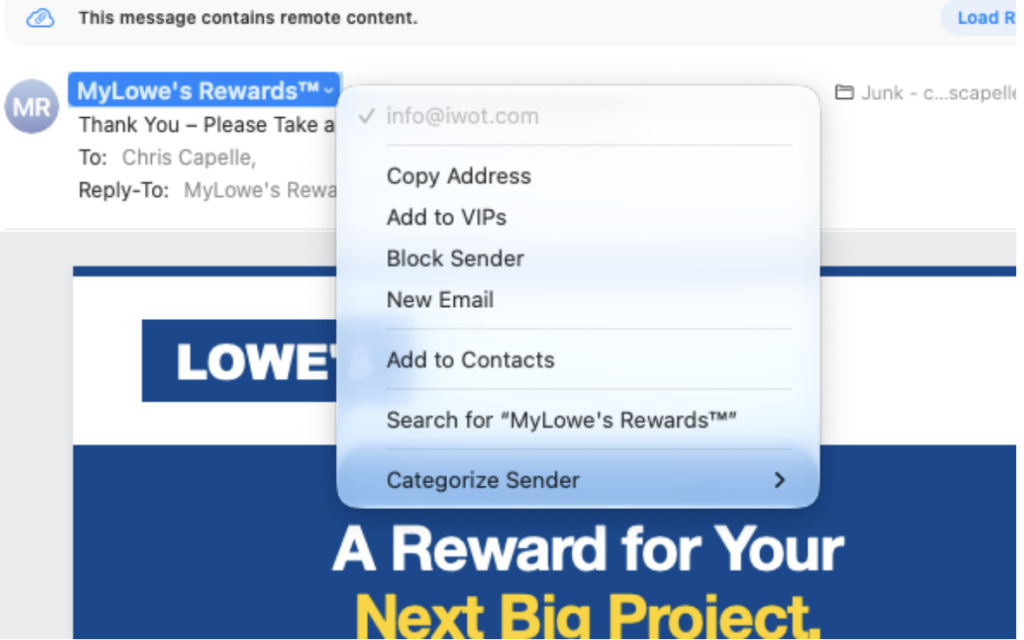
Do you really think that Lowe’s marketing department sends emails from info@iwot.com?

One quick way is to click on the sender and see exactly who the sender is. (Or isn’t.) See the example below – an email from a legit company (Lowe’s), but clicking on the sender’s name reveals the truth; it’s bogus. A good practice is NEVER click links from emails to enter a site, go directly to the site via your browser of choice.

In these instances, don’t click anything, delete the email, and get on with your life. Happy Thanksgiving!

www.chriscapelle.com

Continue Reading

And Speaking of Email Addresses…

There are certain email providers that are no longer ready for prime time. If you have one, you probably know what I’m talking about. These include the ever-infuriating Optimum, but there are others whose time has passed them by. These include Yahoo, Hotmail, AOL, Netscape, and probably a few others. (CompuServe, anyone?)

Photo credit: Magnific

In the last couple of weeks, I had THREE jobs where trying to deal with Optimum phone support took over an hour per job. And one of those issues, Optimum was STILL unable to resolve the issue, blaming the hardware, and suggesting that I call Apple. But I tried adding the email account to four different computers, tried using Apple and Microsoft software, two iPhones and two iPads. Now is that an issue with the hardware or with the provider? 

The bottom line is that we had to establish a Gmail account for the user and have all of her Optimum email forwarded to the Gmail account. I understand that many people don’t like Gmail (and Google in general, for good reasons), but it’s not the only game in town. Take a look at Proton mail next time you’re thinking of switching, There is a free tier and a paid tier (that’s what I use for my chris@chriscapelle.com account), and while it’s a bit tricky to set up initially, it works like a champ. 

Now, if you read my previous blog (and read to its conclusion, you know it’s quite the chore to change your email address for every account you have, but if your email provider stinks, it’ll all be worth it. A good cold Sunday afternoon activity, particularly if you’re a Jets fan.

Continue Reading